
How the Cooke County Court Calendar Works
Begin with the Cooke County Dockets page, the official hub for public schedules. It sorts everything into two columns. One covers the 235th Judicial District Court. The other covers County Court at Law. The district side carries weekly PDFs plus an annual calendar. The county side posts weekly and specialized lists. Each product answers a different question about a Cooke County court date. The annual calendar lays out broad jury, nonjury, and holiday weeks. A weekly docket names cases and times. Specialized lists isolate one setting type, whether status, consultation, arraignment, appeal, or Class C appeal. None of them replaces the filed notice or order for a specific case.
| Calendar product | Best use | Key limit |
|---|---|---|
| 235th annual calendar | Term and trial-week planning | Not a case-specific notice |
| 235th weekly docket | Case number, time, action, offense | May change after posting |
| CCAL weekly docket | Mixed half-hour setting grid | May omit a specialized list |
| Specialized CCAL docket | Status, consultation, arraignment, or appeal | Not a full case history |
Cooke County Docket Hub
The hub is not a name-search database. It is a menu of published PDF schedules. On the 235th side, open the latest weekly docket and search within the document for an exact cause number. On the County Court at Law side, choose the list that matches the event. A family prove-up may sit on a weekly calendar, while a misdemeanor arraignment may appear on a separate arraignment docket.
The official county source shows this split at a glance.
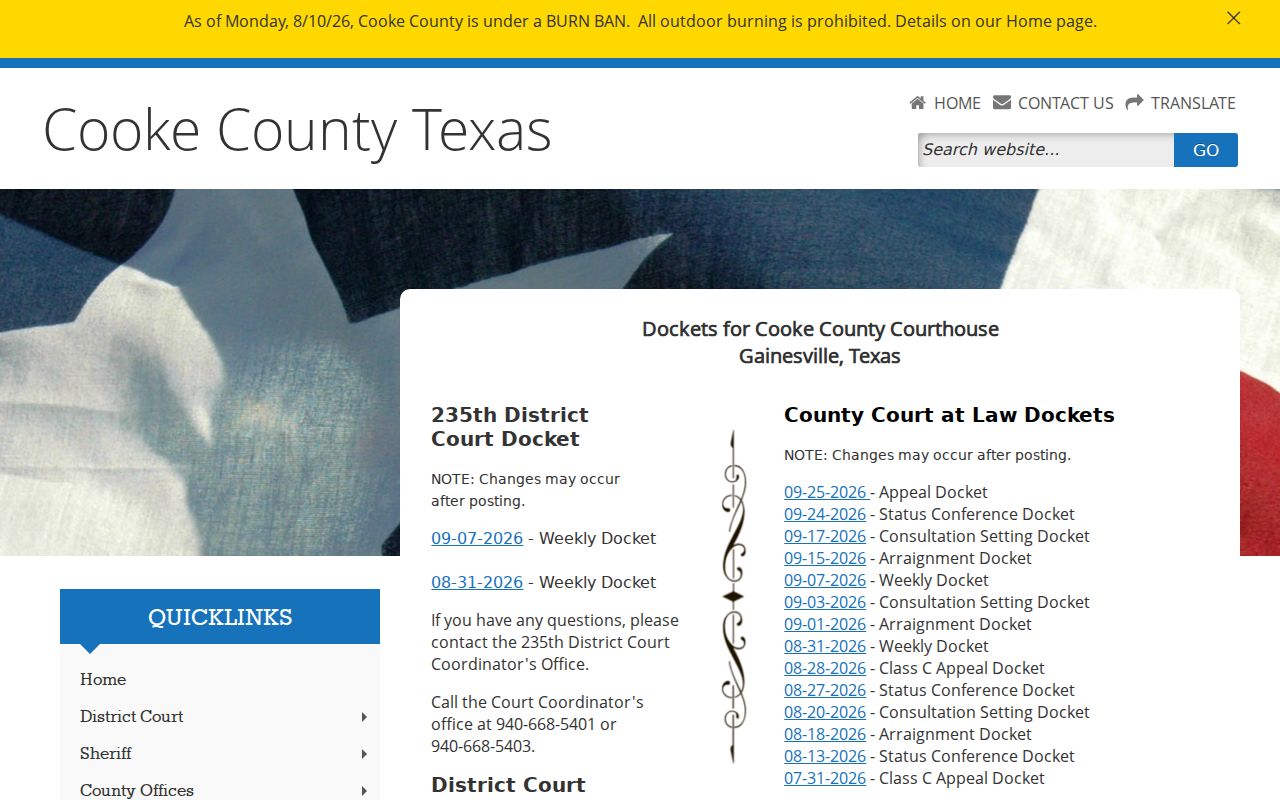
The routing problem is plain on the county's hub page: before hunting for a hearing, you must pick both the right Cooke court and the right kind of schedule.
Cooke County Court Date Lookups
When a setting truly matters, use every channel. Online dockets are fast but can go stale. Portal results may carry a hearing field, though coverage varies by court. The clerk can confirm what the file says. A coordinator handles the working schedule. A paper or daily list at the courthouse may show a current courtroom assignment when one is posted.
- Read the case notice, citation, or order and copy the court and full cause number.
- Open the Cooke docket hub and choose the 235th or County Court at Law side.
- Search the latest weekly or specialized PDF for the cause number.
- Check re:SearchTX or Texas Online Records for an integrated hearing entry.
- Call the correct clerk or coordinator if the date is missing, old, or inconsistent.
- At the courthouse, ask whether a current daily or printed calendar is available for that court.
The 235th Judicial District Court lists two coordinator numbers in the hub: 940-668-5401 and 940-668-5403. The County Court at Law has its own coordinator. Fine-only tickets stay with the issuing JP or municipal court unless an appeal moves them.
Cooke County Calendar Colors
Four color categories shape the 235th annual calendar. Red flags criminal-jury-trial weeks, blue marks civil-jury-trial weeks, green covers nonjury weeks, and white signals courthouse holidays. The colors sketch the court's planned term. They do not assign any single case to a date.
- Red week
- Criminal jury planning period, not a promise that every criminal case is set.
- Blue week
- Civil jury planning period, subject to a case-specific setting.
- Green week
- Nonjury work on the annual calendar.
- White date
- A courthouse holiday shown on the court calendar.
The coordinator sets a case, not the color key. Hearings, per the District Clerk, require a separate notice or order. Read the annual color for context, then confirm the actual Cooke County court date through the weekly docket and the filed notice.
Court Settings: What Each Field Means
One Cooke County court calendar file can hold several dates. The run date and time mark when the list was produced. The docket date is what the schedule covers. The event time is the hour given to the case. In a criminal row, the offense date is a fact of the case. It is never the hearing date.
| Date | The scheduled docket date; distinguish it from upload and run dates. |
|---|---|
| Time | The assigned appearance time, often shown in a time grid. |
| Court or courtroom | The 235th, County Court at Law, or lower court and any listed room. |
| Judge or coordinator | The court official or schedule contact where the source identifies one. |
| Setting type | Arraignment, status, consultation, prove-up, motion, pretrial, or trial. |
| Cause number | The best field for matching the row to the correct case. |
Party and lawyer fields help you reject a wrong match. Avoid copying personal facts from a docket. Instead, record the case number, court, event, date, time, source title, URL, and the day you checked; that becomes a solid citation if the list changes.
Cooke County Specialized Dockets
County Court at Law publishes separate products because its jurisdiction is mixed. The appeal docket covers matters appealed from lower courts. The Class C appeal docket narrows to fine-only appeals from municipal or justice court. The arraignment docket gathers early criminal appearances. Status and consultation lists track different forms of case management.
A status conference row can show the type. It may list a numbered status action, case age, and a count on the sheet. Case age says nothing about the merits. A consultation setting is its own event label, not a final result. The weekly docket can mix family law, prove-up, motion to compel, guardianship, bond-reduction, plea, and jury-trial events into half-hour blocks.
| Label | Meaning | Do not assume |
|---|---|---|
| Arraignment | Early criminal appearance | Guilt or outcome |
| Status conference | Case progress review | Final ruling |
| Consultation setting | Attorney and court consultation | Disposition |
| Prove-up | Evidence in an uncontested matter | Signed decree |
| Class C appeal | Appeal from a lower court | Complete original file |
When a Court Date Moves
A continuance pushes court work to a later date, and a reset assigns another setting. A cancellation removes a planned event, though the case may stay open. Cooke County warns that public dockets can change after posting. So an old PDF may show a time that no longer controls.
If a docket says "continued," check the latest version. Also check the case file for a new order or notice. Call the coordinator if no replacement appears. A missing row is not a dismissal. The case may have moved to a specialized list, been reset after the PDF was produced, or carry restricted information. A trial setting likewise does not prove a trial happened.
Note: save the PDF title and the day you checked. Cooke County court dates can be revised after a public schedule is posted.
Cooke County Uncontested Dates
Cooke County Court at Law sets aside walk-in time on Mondays and Wednesdays. The hours are 9:30 to 10:30. The window covers uncontested divorces, agreed matters, and name changes. Get the file from the District Clerk first. The local rules also allow uncontested non-probate civil matters Monday through Thursday from 8:30 to 9:00, plus uncontested or nonjury probate work on Mondays.
Each window comes with strings attached. A proposed final decree or judgment may have to be filed in advance. The coordinator manages settings. Some matters also require you to bring the file and docket sheets along. A posted window alone does not guarantee a hearing that day. Call ahead to confirm the case qualifies. Check that the paperwork is ready and the procedure still matches the current docket rules.
Practical check: A standing window describes court practice, while a notice, order, or coordinator confirmation places a specific case on the Cooke County court calendar.
Cooke County Court Date Portals
For posted weekly and specialized calendars, the docket hub is the best starting point. Texas Online Records offers a District Clerk route behind an account-based screen. The statewide re:SearchTX service can narrow integrated cases by county, court, case, party, filings, and hearings. Coverage varies by court and record age. So treat no single portal as the complete calendar.
A lower-court date may never show up in the county's district search. Justice and municipal courts keep their own schedules for fine-only cases. Gainesville's E-Court handles hearings rather than serving as a general case database. Lindsay, Muenster, and Valley View each rely on separate municipal contacts. Callisburg's current court forum needs confirmation. For a traffic ticket, the citation issuer tells you which court holds the date.
Does a hearing search turn into a need for the filings behind it? Use the Cooke County case lookup to find the underlying case.
Missed Settings and What Comes Next
Act quickly rather than waiting on the next online update. Call the court named on the notice. Give the full cause number, the missed date, and the type of setting. Ask whether the judge entered an order, issued a warrant where that applies, or reset the matter. Ask also whether a new filing is required. Only the court can give the current instruction for that case.
Missed setting: Call the responsible court or clerk at once. A public calendar cannot cancel an order or supply case-specific legal advice.
Missed a 235rd setting? Use the District Court coordinator or District Clerk. For County Court at Law, use that court's coordinator and the County Clerk record route. A municipal or JP citation goes back to the issuing court. When the schedule and your notice conflict, describe both sources when you call. Save the title and date of the PDF you saw. But follow the court's current instruction.
Verify Every Cooke County Court Date
The strongest check on any Cooke County court date uses three sources. Start with the newest Cooke County court calendar or specialized docket. Then read the latest filed notice or order in the case. Finally, confirm with the clerk or coordinator. Do so when the date carries real consequences or the sources disagree. That approach covers posting delays, resets, and the limits of any portal.
A clerk can also help when the cause number is missing. Detail matters, though. Bring the party name, court, case type, approximate filing date, and any prior paper you hold. Never send private identifiers to an unverified email. For an older case, ask where the date lives. It may sit in a bound volume, microfilm, or another archive instead of the current portal.
Read each field of the Cooke County court docket for what it truly is. A date is only a plan. A filed order records actual court action. A coordinator confirms the working schedule. Keeping those roles straight stops an annual calendar, a run date, or an old weekly PDF. None of those should be mistaken for the current hearing command.